
How Do You Convert BPM to Samples?
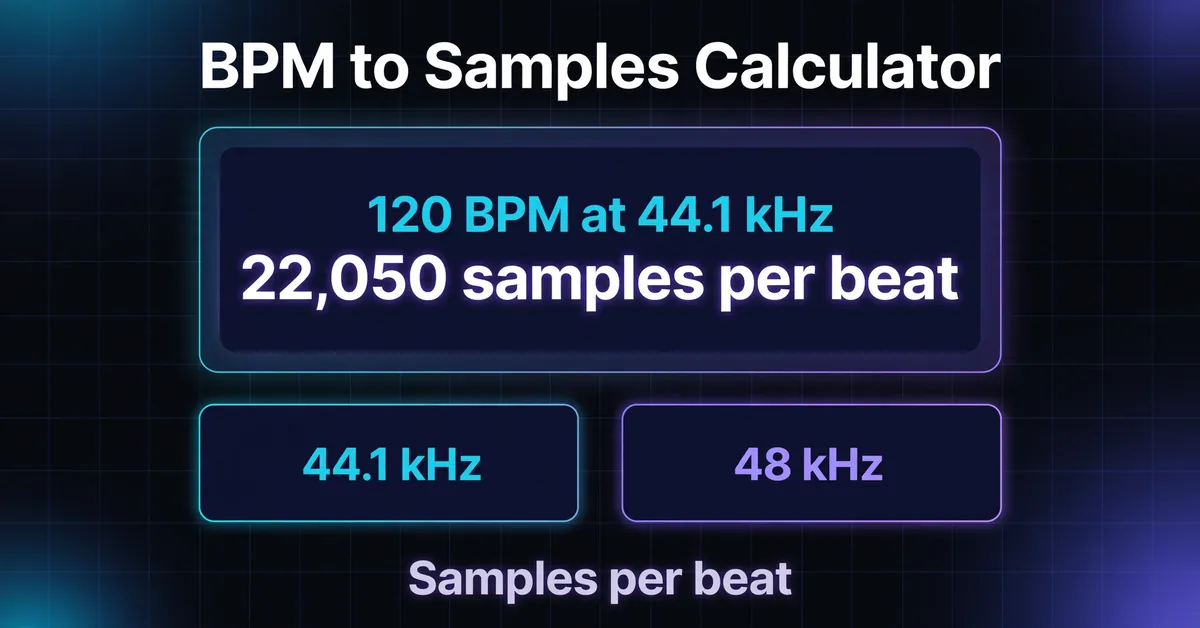
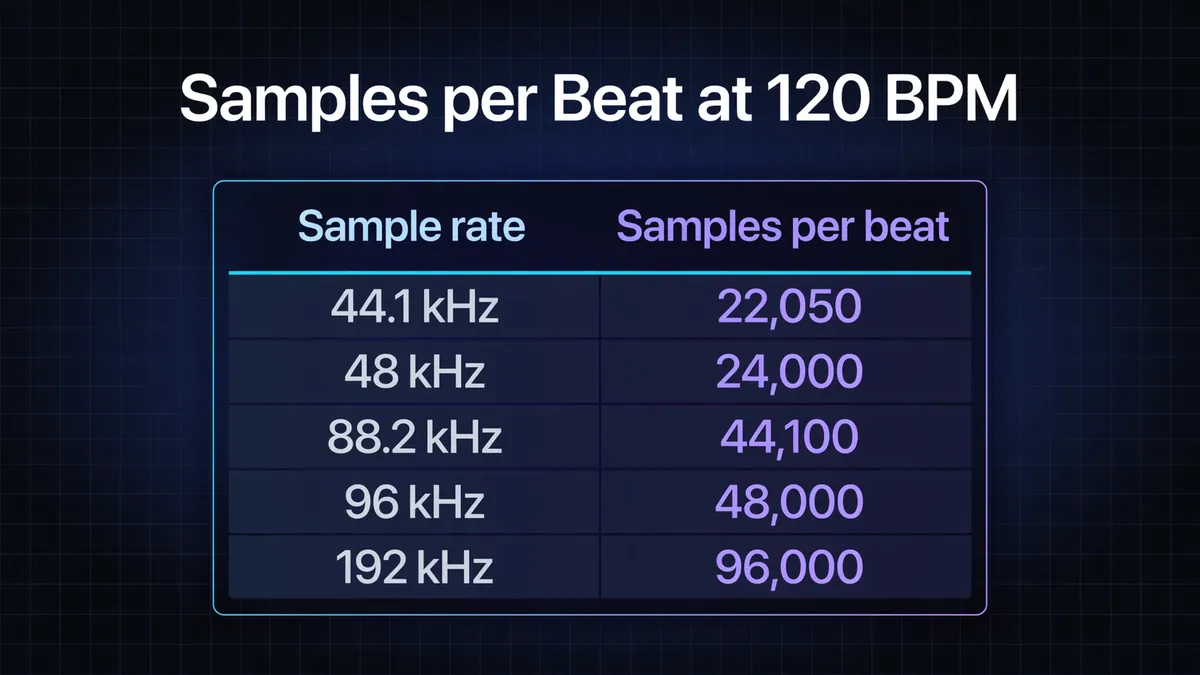
To convert BPM to samples per beat, multiply the sample rate by 60 and divide by BPM. At 48,000 Hz and 120 BPM, one quarter note contains 24,000 sample frames. Choose the rate of the project or file you are measuring, then calculate the note or loop length.
The result is sample frames, or samples per channel. These calculations assume BPM counts quarter notes. For a score marked dotted quarter = 60, enter 90 here.
Enter your tempo, select the sample rate and read the relevant note card. The calculator displays whole frame counts and milliseconds; its copy buttons copy rounded frame counts. Keep the unrounded formula for calculations involving several notes.
A producer preparing a 128 BPM drum loop at 48 kHz starts with 48,000 × 60 ÷ 128 = 22,500 samples per quarter note. That count describes elapsed time. It does not locate a drum transient or choose the start of the phrase.
Which Sample Rate Should You Choose?
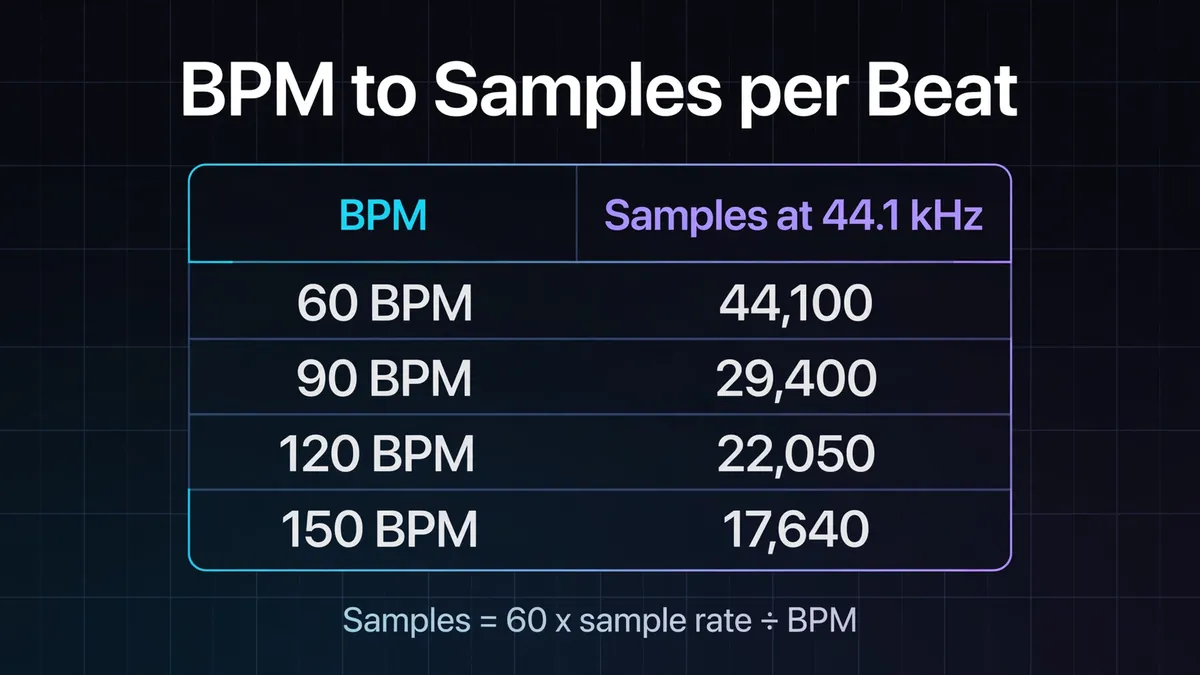
Choose the sample rate of the audio where you will apply the count. A file measured before conversion and a project measured after conversion can have different frame counts for the same duration. The calculator offers 44.1, 48, 88.2, 96 and 192 kHz; use the matching setting.
At 120 BPM, these counts represent one quarter note and one bar of 4/4. BPM counts quarter notes; for a score marked dotted quarter = 60, enter 90.
| Sample rate | Samples per beat | Samples per bar of 4/4 |
|---|---|---|
| 44,100 Hz | 22,050 | 88,200 |
| 48,000 Hz | 24,000 | 96,000 |
| 88,200 Hz | 44,100 | 176,400 |
| 96,000 Hz | 48,000 | 192,000 |
| 192,000 Hz | 96,000 | 384,000 |
These frame counts are exact. Doubling the sample rate doubles the count without changing the beat's duration. A half second occupies 22,050 frames at 44.1 kHz and 24,000 at 48 kHz.
A stereo frame contains one sample for each channel at the same time position. Do not double the timing count because the file is stereo. MDN's explanation of frames and channels distinguishes stored sample values from the frames used to measure time.
How Many Samples Are in Dotted Notes and Triplets?
Multiply samples per quarter note by the note's duration factor. An eighth note uses half the quarter note count; a sixteenth uses one quarter. A dot multiplies the straight value by 1.5. For a triplet, multiply the corresponding straight value by 2 ÷ 3, keeping full precision until the end.
This table uses 120 BPM at 48 kHz, with BPM counting quarter notes. For a score marked dotted quarter = 60, enter 90.
| Note value | Calculation | Sample frames |
|---|---|---|
| Eighth | 24,000 ÷ 2 | 12,000 |
| Sixteenth | 24,000 ÷ 4 | 6,000 |
| Dotted eighth | 12,000 × 1.5 | 18,000 |
| Quarter triplet | 24,000 × 2 ÷ 3 | 16,000 |
| Eighth triplet | 12,000 × 2 ÷ 3 | 8,000 |
For a guitarist printing a dotted eighth echo into a sampler, 18,000 frames is the repeat interval in this example. Three eighth triplet intervals occupy 8,000 × 3 = 24,000 frames, exactly one quarter note. Use the note duration calculator when choosing between the musical values themselves.
How Do You Calculate a Full Loop in Samples?
Multiply the unrounded samples per quarter note by the number of quarter notes in the whole loop. Work out that musical length from both the bar count and time signature. A bar is not always four quarter notes, and a pickup or reverb tail should not silently become an extra beat.
Four bars of 4/4 contain 16 quarter notes. At 120 BPM and 48 kHz, the loop is 24,000 × 16 = 384,000 frames, lasting eight seconds. For a DJ preparing an eight bar 4/4 loop at 128 BPM and 48 kHz, calculate 22,500 × 32 = 720,000 frames, or 15 seconds.
For a musician exporting two bars of 3/4 at 90 quarter note BPM and 48 kHz, there are six quarter notes: (48,000 × 60 ÷ 90) × 6 = 192,000 frames. Multiplying by eight would export too much time.
Compound meter needs the beat unit checked first. A 6/8 bar contains six eighth notes, equivalent to three quarter notes. At dotted quarter = 60, enter 90; one bar then spans 32,000 × 3 = 96,000 frames at 48 kHz. Puget Sound's meter lesson explains the dotted beat in compound meter. Use the tempo calculator for arrangement lengths in seconds.
Why Do Sample Counts Come Out as Fractions?
A musical duration does not always span a whole number of sample intervals. At 120 BPM and 44.1 kHz, a sixteenth note lasts 5,512.5 sample frames. The fraction describes the calculated duration; an edit or export may require a whole frame count. Rounding is a separate decision from calculating the duration.
The calculator shows that sixteenth as 5,513 frames. Stacking 1,000 slices each rounded upward to 5,513 adds 500 frames, about 11.34 ms at 44.1 kHz. This describes separately rounded slices, not a claim that a DAW's musical grid accumulates that error.
Calculate intermediate cut positions from the original timing reference. For successive sixteenths in this example, the ideal offsets are 5,512.5, 11,025, 16,537.5 and 22,050 frames. Rounding each position independently gives 5,513, 11,025, 16,538 and 22,050. The resulting slice lengths alternate between 5,513 and 5,512 frames while preserving the complete quarter note.
If only the final loop boundary matters, calculate and round that complete length once. Do not multiply the rounded note card by the number of notes and assume the result retains the original timing.
How Do You Convert Samples Back to BPM?
To calculate BPM from samples, multiply the sample rate by 60 and by the loop's quarter note count, then divide by its total frames. You must know the musical length. The same audio duration can describe different tempos if you count it as a different number of beats.
A four beat loop with 96,000 frames at 48,000 Hz gives 48,000 × 60 × 4 ÷ 96,000 = 120 BPM. Counting eight quarter notes in that duration gives 240 BPM. Confirm the phrase before trusting either answer; the half time versus double time guide explains the counting distinction.
For a practical measurement, select from one downbeat to the next downbeat after the intended phrase, then read the selection length. Avoid including leading silence or an effect tail. Audacity's Selection Toolbar distinguishes a selection's length from its start and end positions. An endpoint alone is insufficient when the selection starts later in the file.
When Do You Use Samples Instead of Milliseconds?
Use sample counts for loop boundaries, sample based delay controls or timing adjustments between microphone tracks. Use milliseconds when the receiving control asks for milliseconds. Both describe time, but a sample count requires a sample rate to establish its duration. A count specifies an offset without guaranteeing phase alignment across all frequencies.
At 120 quarter note BPM, 500 ms equals 24,000 frames at 48 kHz. For a score marked dotted quarter = 60, enter 90 for note conversions.
A measured 2 ms offset corresponds to 96 frames at 48 kHz. If you are adjusting microphone tracks, use the measured offset and listen to the combined result; the tempo does not tell you how far to move either recording.
Use BPM to MS for direct millisecond conversion and the delay calculator for choosing echo subdivisions. MDN's AudioBuffer reference defines sample rate, integer frame length and duration separately.
What Should You Check Before Applying a Sample Count?
Check whether the count describes your actual audio at its current rate and tempo. A calculated target length does not retime a performance, remove a tail or repair a waveform join. Before cutting a finished loop, confirm its musical boundaries and audition the transition back to the start.
Trimming a 120 BPM performance to the length of a 128 BPM loop cuts material away; it does not move the internal beats into place. In Ableton Live, Warp can synchronize rhythmic audio to the Set tempo, while disabling Warp leaves it at its original tempo. See Ableton's warping manual.
One constant BPM also cannot describe every beat of a tempo changing passage. For separate constant tempo sections, calculate each section at its own BPM and add their durations before final rounding. For a continuous tempo ramp, use the actual tempo map or rendered audio length.